A free recording app for documentation
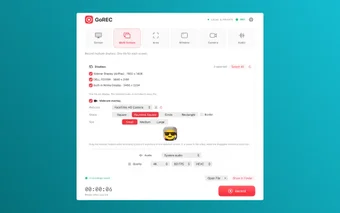
GoREC, developed by Luan Cu Xuan and published by SoftLighter.com for Mac, is a free camera, audio, and screen recording software that lets you capture screen and audio in various ways, including the whole screen, a specific screen size, multiple displays, and more.

Unlock your creativity with Adobe Stock
Get 10 images or 1 video with a free trial
With a clean, minimalist interface, GoREC delivers a reliable recording experience for those seeking powerful yet easy-to-use software to archive everything, including presentations, demonstrations, online lessons, camera videos, and more. This productivity program produces high-quality recordings from one streamlined platform, making it an excellent choice for documentation.
Record screen, camera, audio
With GoREC, you can document many things by recording them. It highlights flexible recording modes, including basic screen recording, multi-screen recording for multiple displays, area recording for a specific part of your screen, camera recording using the built-in camera, audio recording from the system, microphone, or both, and window recording for a specific individual application window.
The live camera recording lets you use not just your built-in iPhone camera but also Mac cameras and even USB cameras. It also features a dedicated live preview window, so you can see the recording. Plus, this feature includes a panel with a recording timer, pause and resume, microphone mute control, system audio mute control, quick camera snapshot, and more.
Meanwhile, the audio controls let you configure it, so you can either add audio or use a microphone. The app also boasts a range of video quality options, and you can export standalone audio recordings. Plus, it does not require an account, and files stay on your device. However, many advanced features are hidden behind a one-time purchase paywall.
Powerful, private, easy-to-use
All in all, GoREC is powerful recording software an excellent choice for documentation, offering a reliable, convenient experience for its users. With its clean, minimalist interface, flexible recording modes, and high-quality outputs, this app becomes a great choice for presentations, online lessons, demonstrations, and more. The downside is that many advanced features are behind a one-time purchase paywall.